Share a public TikTok creator profile — no login needed
Need to send one creator's stats to a teammate or client who has no KOLens login? Share a public profile page — kolens.ai/k/<username>, no account required.
Quick answer
kolens.ai/k/<username>. Anyone can open it — no login, no KOLens account, no credits. The page shows the creator's header, a stats row, an authenticity tier, an audience snapshot, and a grid of recent posts. It is English-only and refreshed about every 24 hours.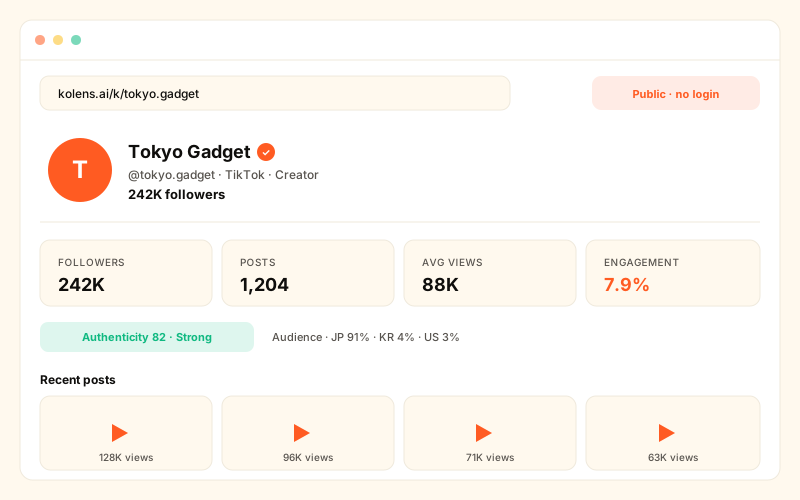
What a public creator page is
Most of KOLens lives behind a login. You sign in, spend a credit, run a scrape, and the results land in your private workspace. That is the right model for research you own — but it is the wrong model for sharing. When you want to send one creator's numbers to a client, a manager, or a teammate who has never heard of KOLens, a login wall is friction.
The public creator page solves exactly that. For every TikTok creator KOLens covers above the follower threshold, there is a standalone web page at a clean, predictable URL. It is not a screenshot, not an export, not a PDF — it is a live page anyone can open in a browser. Send the link, and the recipient sees the same profile you do.
Think of it as a public reference card for a creator: a fast, link-able snapshot that answers "who is this person and are they worth a conversation?" without anyone having to install or sign up for anything.
How to open and share one
The URL pattern is the whole feature. There is no menu to hunt through:
- 1Take the creator's TikTok @handle.Drop the leading
@. If you have a TikTok profile URL likehttps://www.tiktok.com/@charlidamelio, the handle is the part after the@— here,charlidamelio. - 2Build the public URL.Append the handle to
kolens.ai/k/. For the example above that iskolens.ai/k/charlidamelio. The/k/prefix is what marks a page as the public, login-free surface. - 3Open it in any browser — no login.The page renders for anyone. You do not need to be signed in, and neither does whoever you send it to. No credits are spent to view a public page.
- 4Share the link.Paste it into Slack, an email, a brief, or a deck. The recipient opens it and sees the creator's header, stats, authenticity tier, audience snapshot, and recent posts — the same view you have.
One thing to check first
The 100k-follower threshold
Public pages are not published for every creator. KOLens only publishes a public page for creators with more than 100,000 followers. A handle below that line — or one KOLens has never scraped — returns a not-found page rather than a profile.
There are two reasons for the cut-off:
- Public relevance. A public, search-indexed page makes sense for creators who already operate at public scale. Publishing a standalone web page for a 4,000-follower account is not something most of those creators would expect or want.
- Data confidence. Larger accounts have enough recent posts and stable surface data for the stats row and audience snapshot to be meaningful. Very small accounts produce thin, noisy pages.
The threshold applies only to the public page. Inside the app, the login-required lookup at /kols still works for creators of any size — see looking up a creator by handle. If you need a sub-100k creator, use the in-app lookup; the public page is for the larger names you want to share outward.
What each section shows
A public page is built from five blocks, top to bottom. Every one of them is drawn from public TikTok surfaces — nothing private is on the page.
1. Profile header
The avatar, display name, and follower count, with a verified badge when TikTok marks the account verified, the creator's bio text, and an outbound link straight to their TikTok profile. This is the identity block — it confirms at a glance that the link points at the creator the recipient expected.
2. Stats row
Four headline numbers: followers, posts, average views, and engagement rate. Average views and engagement rate are the two that separate a creator with a large but quiet audience from one whose audience actually shows up — far more telling than the follower count alone.
3. Authenticity-score tier
KOLens assigns each covered creator an authenticity-score tier — a plain-language band that summarises how genuine the engagement looks relative to the follower count. The public page shows the tier so a viewer gets a quick honest read without needing to interpret raw numbers.
4. Audience snapshot
A compact view of who follows the creator: the top countries in the audience and the dominant display language. This is the fast answer to "are this creator's followers even in my market?" — a creator whose audience is mostly outside your shipping or campaign region is a different proposition regardless of how strong the other stats look.
5. Recent posts grid
A grid of the creator's recent posts, each with view and like counts. It gives a one-glance read of content style and whether recent performance is steady, climbing, or sliding — the kind of context a single average number cannot carry.
Below the five blocks sits a call-to-action: run a fresh scrape or sign up for KOLens. That is how a public page doubles as a discovery surface — a viewer who arrived from a shared link or a search result can step straight into the full product.
Public page vs the in-app dossier
It is worth being precise about this, because the two pages look similar but are deliberately different. KOLens has two creator pages:
- The public page —
/k/<username>. No login. Shows only non-private, public-surface data: header, stats row, authenticity tier, audience snapshot, recent posts. Built to be shared and indexed. - The in-app dossier —
/kols/<username>. Login required. Everything on the public page plus workspace-private signals: AI brand-fit scoring, ready-to-send outreach drafts, harvested contact emails, and audience drift tracked over time.
The split is intentional. The private signals — your brand-fit score, your outreach drafts, a creator's contact email — belong to your workspace and your campaign. They should not sit on a page that anyone with a link, or a search crawler, can read. So the public /k/ page deliberately shows only the public-surface layer. If you need the brand-fit dossier with scoring and outreach drafts, that is the logged-in in-app dossier, not the public page. And for a deeper read of the audience signals, see the audience snapshot article.
Refresh, language, and data source
A few honest details about what the public page is and is not:
- Refreshed about every 24 hours. The page is not live to the second. Follower count, the stats row, and the recent posts grid reflect the last daily refresh, so treat the numbers as current to within roughly a day.
- English-only. The public page renders in English regardless of the viewer's locale. The in-app workspace is localised; the public surface is not, in its current form.
- Sourced from public TikTok surfaces. Everything on the page comes from data TikTok already exposes publicly. There is no private or panel-licensed data on a
/k/page. - Structured data built in. Each page carries schema.org
Personmarkup, which is what makes it readable by search engines and AI-search tools — and why a public page can pull new users in from search.
If a creator wants their page removed
Because public pages are published from public TikTok data without the creator opting in, KOLens gives creators a clear way out. Every /k/ page carries a takedown / data-deletion request link. A creator, or someone representing them, can use that link to request removal of the page. KOLens processes the request and takes the page down. Keeping that control on the page itself — rather than buried in a support flow — is deliberate.
When to use a public page
Reach for the public /k/ page when:
- You are sharing one creator with someone outside KOLens. A client, an agency contact, or a manager who has no login can open the link and see the creator's stats with zero setup.
- You want a fast public reference card. Instead of screenshotting numbers into a doc, paste the link — it stays current with the daily refresh.
- You want a discovery surface. Because the page is search- and AI-search-friendly, a public profile can bring new users to KOLens from a search result or a shared link, with the built-in call-to-action carrying them into the full product.
And reach for the logged-in /kols dossier instead when you need brand-fit scoring, outreach drafts, a contact email, or audience drift over time — the private research layer that the public page intentionally leaves out.
Frequently asked
- Does a viewer need a KOLens account to open a public profile?
- No. The /k/<username> page is fully public — anyone with the link can open it in a browser, no login, no KOLens account, no credits. That is the entire point: it is the surface you share with people who are not KOLens users.
- Why does my creator return 'not found'?
- Public pages are only published for creators with more than 100,000 followers. A handle below that threshold, or one that is not yet in the KOLens catalogue, returns a not-found page. The login-required lookup at /kols still works for smaller creators — the threshold only applies to the public page.
- How is the public page different from the in-app creator dossier?
- The public /k/ page shows only non-private, public-surface data: header, stats, authenticity tier, audience snapshot, recent posts. The in-app dossier at /kols/<username> requires login and adds workspace-private signals — AI brand-fit scoring, ready-to-send outreach drafts, contact emails, and audience drift over time. None of those private signals appear on the public page.
- How fresh is the data on a public profile?
- Each public page is refreshed roughly every 24 hours from public TikTok surfaces. Follower counts, recent posts, and the stats row reflect that last refresh, so a page is current to within about a day rather than live to the second.
- Can a creator have their public page removed?
- Yes. Every public profile carries a takedown / data-deletion request link. A creator (or their representative) can use it to request removal, and KOLens processes the request and takes the page down.
- Is the public page indexed by search engines?
- Yes. Each /k/ page carries schema.org Person structured data, so it is readable by search engines and AI-search tools. That makes a public profile both a shareable card and a discovery surface that can bring new users to KOLens from search.
Read next
Look up any TikTok creator by @handle — full profile in 30 seconds
Paste @username or a TikTok URL. KOLens scrapes the live profile, computes account age, posting cadence, engagement rate, and avg views. 1 credit per lookup.
The brand-fit dossier — Creator Overview, Deep Analysis, and Background Research
Three layered LLM reads on every creator: a free scored Creator Overview gated on the brand profile, a 5-credit Deep Analysis premium tier, and web-grounded Background Research with citations. All cached, all locale-aware.
TikTok audience snapshot — see where a creator's followers actually live (coming soon)
Sampled country / language / activity / niche signals for any TikTok creator. Honest confidence intervals, no fake demographics. Coming to KOLens.