From Facebook ad spy to creator spy: a watchlist with auto-refresh
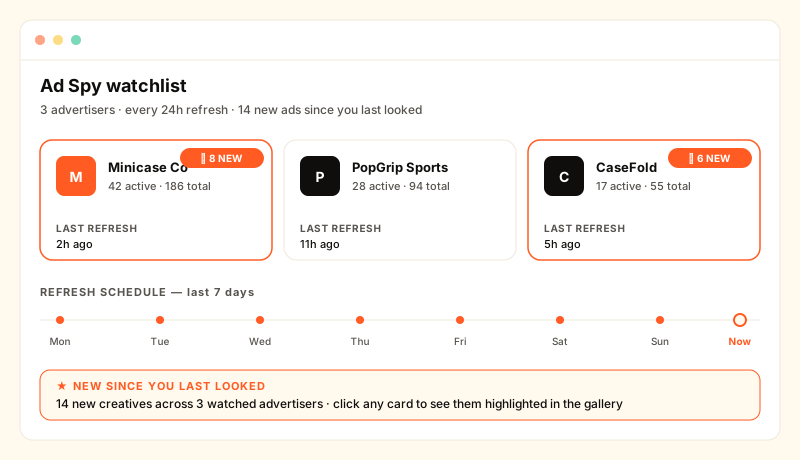
The Facebook Ad Library shows you what's running today. The harder question — 'what changed since I last looked?' — is what a watchlist with auto-refresh actually answers.
Why this post exists
What "ad spy" actually solves
The Meta Ad Library shows the ad creative running right now. That answers "what's live?" but not "what changed?" — the question most competitor-research workflows are really asking. The genuinely useful step is the recurring job underneath: re-check every advertiser every day, store the snapshot, and surface only the deltas the next time a human opens the dashboard.
That recurring-check pattern is portable. It works for any domain where (a) the platform exposes per-entity data, (b) the data changes on a timescale humans care about, and (c) the cost of polling is bounded. Creator partnerships on TikTok hit all three.
The TikTok version of the same workflow
On TikTok, the equivalent of "what new ads is my competitor running?" is "what new sponsored posts is my competitor seeding, and via which creators?" KOLens watchlist entries track creators (or, used reverse-style, the partners of a competitor brand). Each entry has a next_refresh_at column; the watchlist refresh scheduler ticks every minute, picks any entries whose time has come, re-scrapes them via the Apify TikTok actor, writes a fresh KOLSnapshot, and bumps the timer 24h.
Signals fire on facts, not keywords
Google Alerts and most "ad spy" RSS feeds match on text. A watchlist that runs against the underlying platform data can do better — it knows the actual numbers, so the signals it fires are deterministic instead of fuzzy:
- rising_kol — follower delta crosses the growth-detector threshold (configurable per workspace).
- trending_video — a single video's view velocity beats the creator's 90-day baseline.
- new_sponsored — at least one#ad / #sponsored post in the last 14 days.
- new_contact — a business email surfaced after you starred the creator.
- dormant — no posts in >14 days. Useful for catching creators who paused after a brand deal ended.
- no_outreach — your CRM thread is empty or last touched >30 days ago. The watchlist nags when it's the case.
How the refresh loop actually runs
- Scheduler tick — an in-process asyncio loop in the API process wakes every 60 seconds. Single owner across the deployment (the loop is guarded by
WATCHLIST_REFRESH_SCHEDULER_ENABLEDso a future multi-replica setup can pick one elector). - Pick due entries — one indexed query:
SELECT * FROM watchlist_entries WHERE next_refresh_at <= now(), capped at the per-tick limit (currently 20) to keep Apify spend bounded. - Charge credits up-front — the per-handle helper deducts via the shared
charge_for_scrapebilling path. Apify failures refund automatically. - Re-scrape via Apify — runs the
clockworks/tiktok-scraperactor against the handle for up tomax_videos=10. Result lands inDBAuthor+DBVideowith fresh URLs. - Write a snapshot — one row in
KOLSnapshotwith follower count, avg views, engagement rate. The growth detector reads this on the next tick and emits alerts if thresholds crossed. - Bump the timer —
next_refresh_at = now() + 24h. The entry drops out of the picker's window until tomorrow.
Cost shape so you can size it
One refresh = one Apify actor run = 1 credit at the default max_videos=10 cap. A 30-entry watchlist refreshed daily runs 30 credits/day, or ~900/month — about $720/month at the $0.80/credit pack rate to keep 30 competitor handles fully monitored every day. Refresh weekly instead (~130 credits/month) or track fewer handles to size it to your budget. Either way the spend is bounded, because the scheduler caps at 20 entries per minute regardless of list size.
When this is the wrong tool
- You actually need Meta paid-ad creatives (display ads, video ads served in Facebook's feed). Use the Meta Ad Library directly — KOLens doesn't ingest it.
- You need real-time alerts (minutes, not 24h). The watchlist refresh cadence is daily; for per-event triggers, the alerts/webhook subsystem fires on growth alerts as they're computed, but only against handles already on a watchlist.
- You only care about a creator once (vetting before outreach). Use the dossier surface (
/k/{handle}) — it's free of the watchlist's refresh cost and renders from cached data.
How to set one up
Drop a competitor brand's TikTok handle into the dossier, click the partner-creators tab, star the handles you want to track. Or skip the brand and paste creator handles directly into /watchlist/add. Either way each entry's next_refresh_at is set to "now" so the first refresh runs on the next scheduler tick. Come back Monday morning; the rows with the bright signal badges are the ones that actually moved over the weekend.
Frequently asked
- Does KOLens have a Facebook Ad Library equivalent?
- Not for Facebook itself — KOLens is TikTok / Instagram / X / Douyin focused. What it does have is the workflow shape ad-spy tools popularised: watch a list of competitors, auto-refresh, surface only the deltas. We apply that to creator partnerships (which TikTok brands now spend on instead of pure paid ads) rather than to ad creatives in a feed.
- How often does the watchlist auto-refresh?
- Once every 24h per entry by default. The scheduler picks rows whose next_refresh_at has passed, re-scrapes them via the Apify pipeline, writes a new KOLSnapshot, runs the growth detector, and bumps next_refresh_at by 24h. You can change cadence per watchlist if you want some advertisers checked more often.
- What counts as 'new' on a refresh?
- Six signal types are computed when you load the watchlist: rising_kol and trending_video from the growth detector, dormant if no posts in >14d, new_sponsored when an is_ad / is_sponsored post landed in the last 14d, new_contact if an email surfaced after the entry's added_at, and no_outreach when the CRM thread is empty or >30d quiet. Rows with high-severity signals sort to the top.
- Where do I add competitor brands to the watchlist?
- Either by handle (paste the creator URL into /watchlist/add) or by working backwards from a competitor: drop their TikTok handle into the dossier, pull the 'who they collab with' list, and star the partners you want to track. The watchlist row is the long-running observation post; the dossier is the one-shot lookup.
- How is this different from setting a Google Alert?
- Google Alerts notify on text matches — useful for press, useless for whether a creator dropped a new TikTok Shop link this morning. The watchlist runs against the actual platform data: views, follower delta, sponsored ratio, contact metadata, last-post recency. Signals fire on facts, not on keyword matches.
Read next
Watchlist as a monitoring dashboard, not a bookmark list
KOLens Watchlist now surfaces signal badges — rising_kol, trending_video, dormant, new_sponsored, new_contact, no_outreach — plus the latest video thumbnail, outreach status, and brand-fit star rating per row. Sorted by 'needs attention'.
Why KOLens's Data Is a Snapshot — and How Watchlist Gives You Live Tracking
KOLens captures a creator snapshot at search time, not a live mirror. Here's why that's the right tradeoff and how Watchlist layers continuous monitoring on top.
Push KOLens growth alerts to Slack, your inbox, or any webhook URL
KOLens alerts now ship to email + webhook the moment the detector fires. Slack inbound URLs, Zapier, custom endpoints — same JSON payload, configurable per-channel mute, throttle to avoid burst spam.