Push KOLens growth alerts to Slack, your inbox, or any webhook URL
Stop checking the alerts page. Configure once, get a Slack ping the moment a watched KOL grows 20%+ or a competitor's audience shifts country.
Quick answer
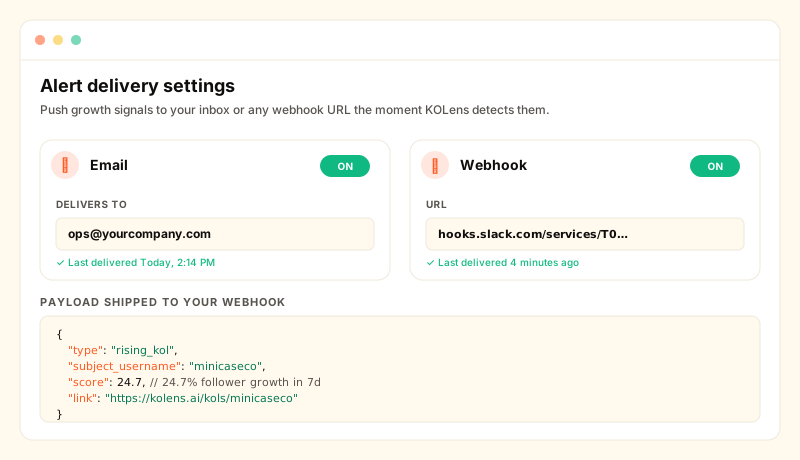
The alerts feed nobody visits
Growth signals only matter if you act on them while they're fresh. A "rising KOL" alert that you discover three days later isn't a signal — it's archaeology. KOLens has shipped a detector + an in-app feed at /alerts for a while, but the loop was always: notification email → log into KOLens → check feed. That first step is the one most users skipped.
The new delivery layer cuts the loop. The detector fires → KOLens pushes the alert directly to your inbox or webhook → you click the link in the message and land on the relevant KOL.
How to wire it up
- 1Open /alerts/settings.New page. Two cards (Email, Webhook), each with an enable toggle + the contact field, plus mute-by-type checkboxes and a per-hour throttle.
- 2Email — paste an address, save.KOLens uses plain SMTP — set
SMTP_HOST/SMTP_USER/SMTP_PASSWORD/SMTP_FROMon the API service (Resend, Postmark, AWS SES, Mailgun all expose port 587 + STARTTLS). When SMTP isn't configured the email channel silently no-ops; the settings UI still lets you save the address. - 3Webhook — paste any HTTPS URL.KOLens POSTs the JSON payload (see below) with a 3 second timeout. Slack incoming hooks, Zapier catch hooks, n8n, Tines, your own internal endpoint — anything that takes a plain JSON POST works. Optionally provide a shared secret to sign each push per the Standard Webhooks spec — three headers go out:
webhook-id,webhook-timestamp, andwebhook-signature: v1,<HMAC-SHA256>. DingTalk URLs auto-switch to DingTalk's query-string sign instead. - 4Send a test, verify, save.The "Send test alert" button fires a synthetic alert through every enabled channel and reports per-channel success right on the page. Last-error banner per channel surfaces SMTP / DNS / 4xx failures so you can fix them without grep-ing logs.
Webhook payload shape
Stable JSON. We add fields, never rename — Zaps + scripts that depend on these keys today will keep working as new alert types land.
id— the alert UUID. Doubles as a Slack message dedupe key.type— one ofrising_kol,trending_video,audience_drift.subject_username/subject_video_id— what the alert is about.score— numeric severity (% growth for rising_kol, view spike multiplier for trending_video, percentage-point delta for audience_drift).payload— type-specific facts. For rising_kol:{ delta_pct, baseline, current }; for audience_drift:{ country, delta_pct, prev_pct, new_pct }.link— pre-built deep link into KOLens (e.g.https://kolens.ai/kols/minicaseco) so the recipient can jump directly to context.created_at— ISO 8601 timestamp.
The per-hour throttle
A trending video can produce a burst (multiple watched KOLs all commenting on it within an hour). Without a throttle that means 15 Slack pings in one minute. The default cap is 20 deliveries per hour per user, shared across all enabled channels — beyond that, alerts still write to the in-app feed but skip push. Adjustable on the settings page (set 0 to mute push entirely without losing the in-app trail).
vs the alternatives
- Modash + Zapier — the indirect path. Modash does the detection, Zapier polls + fires. Two subscriptions + one polling delay. KOLens delivers at detection time natively.
- Roll-your-own Apify scheduler — possible if your team has the engineering bandwidth. KOLens skips the "did it already fire today?" dedup logic that's annoying to get right at scale.
- The old in-app alerts page — still there, now with a "Delivery settings" link in the corner. The push channels are additive, not a replacement.
Frequently asked
- Which alert types fire?
- Three in v1. rising_kol — a watched KOL's follower count or engagement spiked above the detector threshold. trending_video — one of their videos is going viral. audience_drift — a creator's audience country mix moved by ≥10 percentage points between two consecutive Audience Snapshot samples.
- Does it work with Slack incoming webhooks?
- Yes. Slack incoming hooks accept any JSON POST. The KOLens payload includes a `text`-equivalent description in the `payload.payload.note` field that Slack will render verbatim if you wire up a basic transformer in Slack's webhook UI; for richer formatting, route through a Zap or your own endpoint.
- What about authentication on the webhook side?
- Optional shared secret. Set it in /alerts/settings and KOLens signs every push per the Standard Webhooks spec (standardwebhooks.com) — three headers go out: webhook-id, webhook-timestamp, and webhook-signature: v1,<base64-HMAC-SHA256>. Verify on your side by re-computing the HMAC over `{id}.{timestamp}.{body}` with the same secret. For DingTalk URLs the same secret is used for DingTalk's query-string sign instead.
- Will it spam me when something goes viral?
- No. There's a per-channel rate-per-hour throttle (default 20). When the detector finds a burst, only the first 20/h get pushed; the rest stay in the in-app /alerts feed and you can browse them on the page when you have time.
- Can I mute a specific alert type?
- Yes. The settings page has a checklist — uncheck rising_kol or audience_drift to mute just that type. Newly-shipped alert types default to ON for existing users.