Find TikTok creators by country (region targeting)
Pass a two-letter country code and KOLens browses TikTok as if from that market — surfacing creators and content localized to where you actually sell.
Quick answer
JP, US, BR, DE, ID) as a region and the scraper browses TikTok's keyword feed as if from that market — surfacing localized creators and content. Set it on a one-off search or fix it on a recurring Discovery Plan. Region is a soft signal: it localizes which creators show up, it does not guarantee every creator is a national of that country.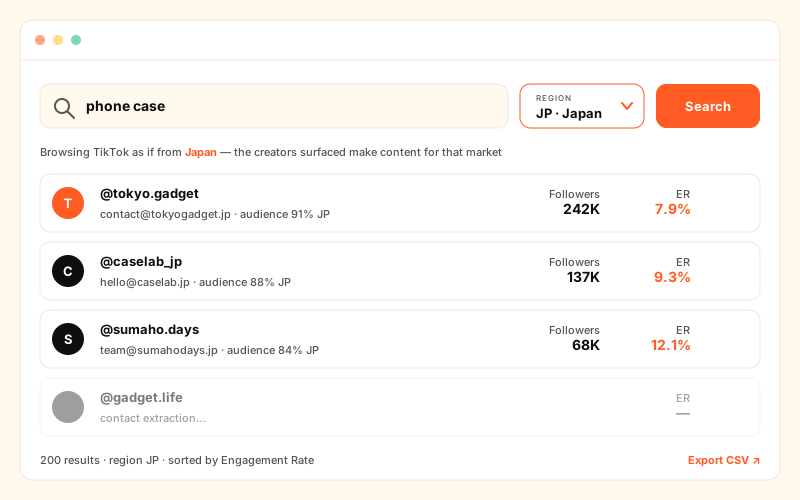
Why a US-default feed hurts cross-border sellers
Until now, every KOLens keyword search browsed TikTok from the United States. For a US brand that is the right default. But most KOLens users are cross-border (出海) sellers — a phone-case brand expanding into Japan, a baby-products seller targeting Brazil, a gadget store launching in Indonesia. For them, a US-default feed is a problem.
Search phone case from the US and you get US creators, US slang, US trends, and emails that route to US-based management. None of that helps you sign a creator who can actually sell to shoppers in Tokyo. You would have to manually sift hundreds of irrelevant results to find the handful of Japan-facing creators buried in the list.
Region targeting fixes this. You tell KOLens which market you sell into, and the scraper browses TikTok's keyword and hashtag feed as if it were a shopper in that country — so the creators and content that surface are localized to where your store actually ships.
How region targeting works
The new region parameter is an ISO-3166 alpha-2 country code — a two-letter code like JP (Japan), US (United States), GB (United Kingdom), DE (Germany), BR (Brazil), or ID (Indonesia). KOLens validates that the value is a real two-letter code and uppercases it automatically, so jp and JP behave the same.
That code drives the scraper to browse TikTok's keyword / hashtag feed as if the request originated from that country. TikTok's feed is heavily localized — what you see for a hashtag in Japan is a different creator mix than what you see for the same hashtag in the US. By browsing from your target market, KOLens surfaces the creators and content that market actually sees.
If you omit region, KOLens browses from the United States — the unchanged legacy behavior. Existing searches and Discovery Plans without a region keep working exactly as before.
Two ways to set the region
Region targeting works at two levels: a one-off scrape for a quick look, or a fixed setting on a recurring Discovery Plan.
1. A one-off scrape via the Claude MCP tool
If you have connected KOLens to Claude via the MCP plugin, the scrape_tiktok_by_keyword tool now accepts a region argument. Ask Claude to run a localized search and it calls:
scrape_tiktok_by_keyword(keyword="phone case", region="JP")— a one-off scrape that browses TikTok from Japan and returns creators localized to that market.- The
regionargument is validated as a two-letter code and uppercased, soregion="jp",region="Jp"andregion="JP"all resolve identically. - Drop the argument entirely —
scrape_tiktok_by_keyword(keyword="phone case")— and the scrape browses from the US, the default.
Use the one-off form when you are exploring a new market and want to see the creator pool before committing to a recurring plan.
2. A fixed region on a recurring Discovery Plan
A Discovery Plan re-runs the same keyword search on a schedule and stacks a fresh creator cohort every run. Plans now carry a region too: the create modal and the plan edit page both include a region selector — a dropdown of country codes.
Pick the country once on the <select> when you create the plan, and every scheduled run inherits it. A daily plan for phone case with region JP keeps pulling Japan-localized creators day after day — you never re-set the region. Need to pivot to a new market? Open the plan edit page, change the selector, and all future runs follow the new region.
Step-by-step: a region-targeted Discovery Plan
From zero to a recurring, country-localized creator feed in under two minutes.
- 1Open Discovery Plans and click Create plan.The create modal opens with the keyword field, a results count, a schedule, and — new — a
regionselector. - 2Enter your keyword and pick the target country.Type a product-category keyword (
phone case,baby stroller) and choose the country from the region<select>— e.g.JPfor Japan,BRfor Brazil. Leave it on the default to browse from the US.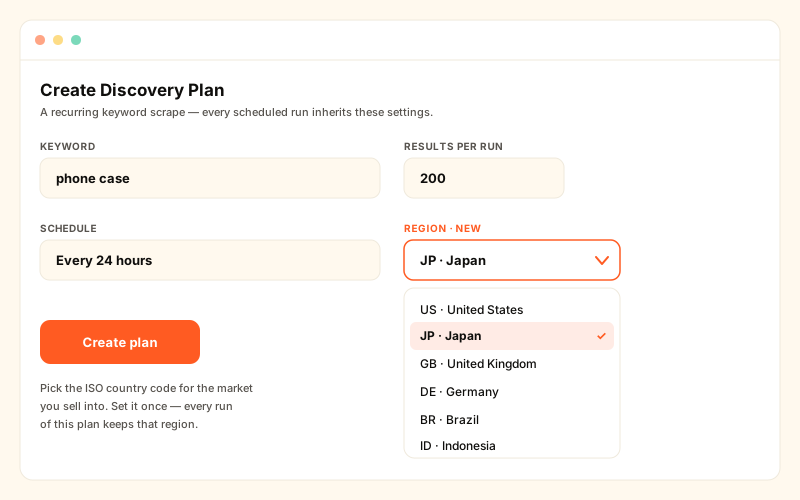
The Discovery Plan create modal now has a region dropdown. Pick the ISO country code for the market you sell into — every scheduled run inherits it. - 3Set the schedule and save.A 24h cadence is the common choice — each run stacks a fresh batch of region-localized creators. The plan runs hands-free from here.
- 4Confirm with the audience snapshot.Region biases which creators surface; it does not certify each one's audience. Open the audience snapshot on a shortlisted creator and check the audience-country breakdown before you reach out.
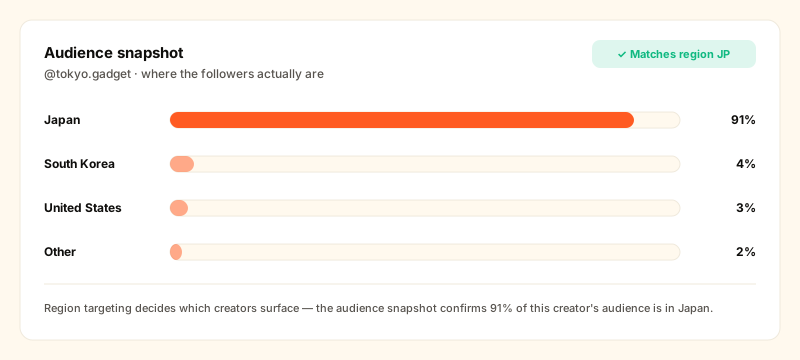
Region localizes which creators surface — the audience snapshot confirms a creator's audience-country actually matches your target market.
Important: region is a soft signal, not a filter
Be clear on what region targeting does and does not do. It is a soft signal — it sets the proxy / browse location KOLens uses to view TikTok. It is not a hard filter on a creator's nationality or registered country.
- What it does: strongly shifts the creator pool toward a target market. Searching
region="JP"surfaces far more Japan-facing creators than a US-default search would. - What it does not do: guarantee that every single result is a Japanese national, or that every creator's audience lives in Japan. A creator who posts in Japanese but has a pan-Asian audience can still surface.
This is why we recommend pairing region targeting with the audience snapshot. Region gets you a localized shortlist fast; the audience snapshot's audience-country analytics tell you whether a specific creator's followers actually sit in your target market. Use region to narrow, use the audience snapshot to confirm.
vs the manual workarounds
| Tool | Gap | KOLens |
|---|---|---|
| US-default search, then manual filtering | Sift hundreds of off-market results by hand | Feed localized to your market from the first result |
| A separate VPN + fresh TikTok session per country | Slow, fragile, no email extraction | region=JP on one search or one Discovery Plan |
| Guessing nationality from a creator's bio | Bio language is a weak proxy for audience | region narrows, audience snapshot confirms the audience |
Common region codes to start with
- East Asia —
JPJapan,KRSouth Korea,TWTaiwan: high-value, design-led markets. - Southeast Asia —
IDIndonesia,THThailand,VNVietnam,PHPhilippines: fast-growing TikTok Shop markets. - Europe —
GBUnited Kingdom,DEGermany,FRFrance: mature e-commerce, strong creator economies. - Americas —
USUnited States,BRBrazil,MXMexico: the default plus the two largest Latin American markets.
Next step
New accounts come with 50 free credits — enough to run a region-targeted search for every market on your roadmap. Start with a one-off scrape_tiktok_by_keyword(keyword="...", region="...") to scout a market, then promote the keyword to a Discovery Plan with the region locked in, and let it stack a localized creator cohort every day.
Frequently asked
- What is the region parameter?
- It is an ISO-3166 alpha-2 country code — two letters such as JP, US, GB, DE, BR or ID. KOLens validates the code, uppercases it, and uses it to browse TikTok's keyword and hashtag feed as if the request came from that country, so the surfaced creators and content are localized to that market.
- Does region guarantee every creator is from that country?
- No. Region is a soft signal — it sets the browse/proxy location, not a hard nationality filter. It strongly shifts which creators surface toward a given market, but it does not certify that each result is a national of that country. Pair it with the KOLens audience snapshot to confirm a creator's audience actually sits in your target country.
- How do I set the region on a one-off search?
- Via the MCP tool: call scrape_tiktok_by_keyword(keyword="phone case", region="JP"). The region argument accepts a validated two-letter code and is uppercased automatically. Omit it and the scrape browses from the US, which is the unchanged legacy default.
- Can a Discovery Plan use a fixed region?
- Yes. The Discovery Plan create modal and the edit page now include a region selector. Choose the country once and every scheduled run of that plan inherits it — so a daily plan keeps stacking creators localized to the same market without re-setting anything.
- What happens if I leave the region empty?
- KOLens browses TikTok from the United States, which is exactly how discovery worked before this feature shipped. Existing searches and plans without a region are unaffected.
- Who should use region targeting?
- Cross-border (出海) e-commerce sellers and brands launching into a specific market. If you are selling phone cases in Japan or baby products in Brazil, region targeting surfaces creators making content for that market instead of a US-default feed.
Read next
How to find TikTok KOLs by keyword (with verified emails)
KOLens crawls TikTok live, ranks 200+ creators by engagement, and extracts the verified business emails from every bio link — in under one minute. No annual contracts.
Automate TikTok KOL discovery — Discovery Plans run daily for you
Set a keyword + interval. KOLens re-scrapes TikTok every 24h, surfaces only new creators, and auto-adds them to your KOL list. No ChatGPT needed; just the keyword.
Case study: 50 US baby-stroller KOLs in one Friday afternoon
A composite case from a US DTC baby brand that needed to find, qualify, and draft outreach to 50 baby/parenting creators before a Monday review. Total active operator time: 65 minutes. Total LLM + scrape spend: ~$3.20.