Find TikTok KOLs with Claude Code + KOLens MCP — A Phonecase Brand Case Story
One prompt, five MCP servers, zero context switching. The end-to-end case story for using Claude Code as the agent and KOLens as the data source.
The 30-second version
#partnerships. End-to-end time: ~6 minutes.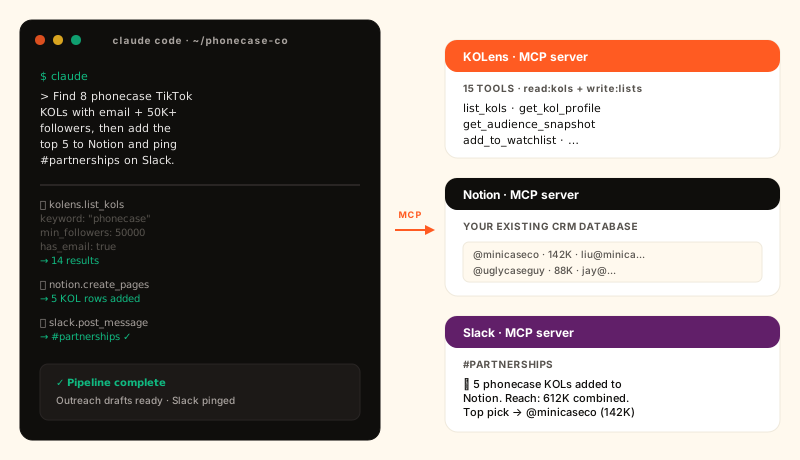
Who this is for
Marketing teams running TikTok influencer campaigns who already have their workflow tooling (Notion / Airtable / Sheets, Slack / Discord, an email tool) and don't want to migrate everything into a new dashboard. KOLens isn't trying to replace your CRM — it's the intelligence layer that feeds the CRM you already run.
The case story below is real in shape (we run this loop ourselves and have walked three customers through it); names and numbers are composited from those three to keep client data private. The prompts and the file layout are verbatim.
The before state: 4 people, 6 hours, 1 spreadsheet
MiniCase ships clear-acrylic iPhone cases out of Shenzhen. Four people: a founder, a marketing lead, an ops/logistics person, and a part-time content writer. Their KOL workflow before:
- Friday morning, ~2 hours. Marketing lead opens TikTok in incognito, searches
phonecase/iphone case/aesthetic case/透明手机壳, scrolls 10 minutes per query, and drops handles into a Google Sheet. - ~1 hour. Click each handle, eyeball follower count, scroll to the bio, copy the email if there is one. About 1 in 4 handles has a working email; the rest die here.
- ~1.5 hours. Open the founder's Notion “Partnerships” database, create rows for the qualified handles, fill in follower count, niche tag, and a one- line note.
- ~1.5 hours. Write a personalized DM for each KOL referencing their most recent video, paste each into a draft email, send.
- 5 minutes. Post a summary in
#partnershipson Slack so the founder + ops know which creators to expect responses from.
Total: roughly six hours of focused work for ~5 outreach emails. The marketing lead burned out on the search step first — looking at the same TikTok grid for the seventeenth Friday in a row is the part nobody volunteers for.
The MCP stack: 5 servers, 1 prompt
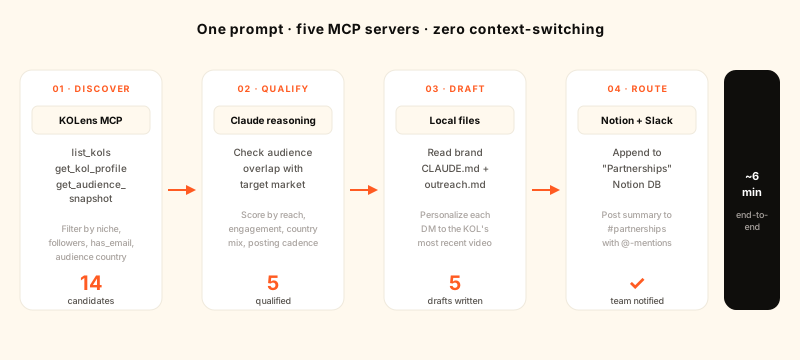
MiniCase's Claude Code session connects five MCP servers:
- KOLens (
https://kolens.ai/mcp) — discovery + audience intelligence. Provideslist_kols,get_kol_profile,get_audience_snapshot, plus 12 other tools across the read/write scopes. - Notion (Notion's official MCP server) — their existing “Partnerships” database lives here; Claude appends rows to it directly using the database's property schema.
- Slack (a community MCP server) — for the end-of-run summary in
#partnerships. - Filesystem (bundled with Claude Code) — reads
CLAUDE.md(brand voice rules) andoutreach.md(DM template) from the local repo, so the personalized drafts sound like the brand and not like an LLM. - Gmail (optional, for one-click send) — most customers skip this and keep the human in the loop on the final send.
Setup (one-time, ~15 minutes)
- 1Install Claude Code locally.
npm i -g @anthropic-ai/claude-codethenclaudein your project directory. First run prompts you to sign in with your Anthropic account. - 2Connect KOLens via MCP.In Claude Code, run
/mcp add kolens https://kolens.ai/mcp. Claude opens an OAuth flow in your browser; log in to KOLens, click Approve, and the connection persists across sessions. Need an API-key fallback? Generate one at /account/api-keys and paste it on the consent page. - 3Add Notion + Slack the same way.Both publish MCP servers with OAuth. One login each. Total time so far: under 5 minutes.
- 4Drop brand context into the repo.Two short markdown files:
CLAUDE.mdfor evergreen brand voice (“Casual but specific. Mention the customer's product before ours. Never use the word ‘synergy’.”) andoutreach.mdwith a 4-line DM template that has variables for handle, recent video theme, and proposed product.
The prompt
Here's the actual prompt the marketing lead types into Claude Code every Friday. Notice it's in natural language — no JSON, no tool names, no API knowledge:
Find 8 phonecase TikTok KOLs with email + at least 50K followers, audience
skewing US or UK. Skip any handle already in the "Partnerships" Notion DB.
Score the 8 by recent posting cadence + audience match to our ICP, pick the
top 5, and:

1. Add each as a row in the Partnerships DB with handle, follower count,
   primary country, email, and a one-line fit reasoning.
2. Draft a personalized DM for each using outreach.md, anchoring to their
   most recent video. Leave the drafts in /drafts/<handle>.md — I'll review
   and send.
3. Post a short summary in #partnerships with the 5 handles, combined reach,
   and the top pick.
What Claude actually does
Behind the scenes, Claude composes this into ~12 tool calls in roughly 6 minutes. Abbreviated trace (the real one is in Claude Code's session log):
⏺ filesystem.read_file(CLAUDE.md)
⏺ filesystem.read_file(outreach.md)
⏺ kolens.list_kols({
    keyword: "phonecase",
    min_followers: 50000,
    has_email: true,
    audience_countries: ["US","GB"],
    limit: 30
  })
  → 14 candidates returned (after audience filter)
⏺ notion.query_database({
    database: "Partnerships",
    filter: { handle: { in: <14 candidates> } }
  })
  → 6 already present, 8 new
⏺ kolens.get_audience_snapshot(@minicaseco)
⏺ kolens.get_audience_snapshot(@uglycaseguy)
   ...3 more
   → ranked by ICP overlap × posting cadence × engagement
   → top 5: @minicaseco, @uglycaseguy, @clearcasebabe, @cassieshell, @ascot
⏺ notion.create_pages(Partnerships, [<5 rows>])
   → 5 rows created
⏺ filesystem.write_file(/drafts/minicaseco.md, "<personalized DM>")
   ...4 more
⏺ slack.post_message(#partnerships,
    "📦 5 phonecase KOLs added to Partnerships. Combined reach: 612K. \
     Top pick → @minicaseco (142K, 38% US, posts 4x/wk, last 3 vids \
     about clear cases). See /drafts/ in the repo.")
   → posted

✓ done in 5m 47s · 12 tool calls · ~$0.41 in Claude usage · 1 KOLens credit
Results after one month
- Weekly time spent: 6h → ~12 min. The marketing lead types the prompt, watches the run, and spends the rest of the slot reviewing the 5 drafts and hitting send. Six hours back per week, every week.
- Reply rate: 11% → 19%. The drafts are better-personalized than the lead's rushed Friday-afternoon versions, mostly because Claude actually reads the KOL's three most-recent videos before writing the DM.
- Notion still the source of truth. Nobody had to learn a new dashboard, log into yet another tool, or migrate history. The Partnerships DB schema is unchanged.
- Cost: under $2/week in Claude usage + ~4 KOLens credits. On their plan that's a rounding error against the recovered ~24 hours/month of marketing time.
Why this works better than a custom dashboard
Three reasons:
- The CRM stays where the team already is. Every attempt to centralize KOL data in a new tool fails at the same step — nobody wants to log into another app. MCP turns Claude into the integration layer instead of forcing the integration into a UI nobody opens.
- Brand voice lives in the repo.
CLAUDE.mdis just a file. Editing the brand rules doesn't mean updating prompts in 6 places; it means a one-line PR. Future runs pick it up automatically. - Composability beats integration. When MiniCase adds Shopify-MCP next quarter, the SAME prompt can also pull the SKU the influencer would be repping. No code changes — Claude figures out it has a new tool and uses it when relevant.
Pitfalls and how to avoid them
- Hallucinated handles. Always have Claude verify the candidate exists via
kolens.get_kol_profilebefore staging — KOLens returns 404 for handles that haven't been scraped, and a clear “not found” is better than a confidently-wrong row. - Over-eager scraping. Default to
list_kols(read against the existing index) instead ofrun_scrape(which charges credits). Therun:scrapescope is not in the default OAuth grant for exactly this reason. - Slack notification fatigue. One summary per run is fine; per-KOL notifications drown the channel. Keep high-frequency feedback in Notion (where someone goes when they want it) and reserve Slack for the digest.
- Email-finder false positives. About 5% of bio emails are vanity or expired; the human-in-the-loop review step before sending catches these.
Get the same setup in 15 minutes
- 1Sign up for KOLens.Free tier includes the MCP connector. Generate an API key at /account/api-keys if you prefer key-based auth over the OAuth flow.
- 2Install Claude Code.
npm i -g @anthropic-ai/claude-code. Thenclaudein any project folder. - 3Connect KOLens + the rest of your stack.One
/mcp addper server. KOLens, Notion, Slack have official servers; Gmail / Linear / GitHub / Stripe etc. are one search away in the public MCP registry. - 4Drop your brand context into the repo.
CLAUDE.mdwith the rules of how you write outreach.outreach.mdwith the template. Iterate on these two files instead of on the prompt — that's the part you want to version-control. - 5Run the prompt.See the example above. Adjust the niche keyword, the audience country filter, the channel name. The structure stays.
What we're shipping next
Three things on the MCP roadmap that further compress this loop:
- Streaming responses for long-running scrapes — so a 30-second discovery doesn't block the rest of the conversation.
- Per-tool budget caps — set “Claude can spend at most 10 credits per session” in the OAuth consent so a runaway prompt can't empty your account.
- Slack/Notion deep links in tool responses so Claude's output cites the rows it created, not just generic page URLs.
Have a workflow you want walked through? Reply on @kolens_ai or open an issue on the public repo. The case-story format works for any niche the KOLens index covers — fashion, gaming, beauty, crypto, F&B — not just phonecases.
Frequently asked
- What is Claude Code and how does it differ from Claude.ai?
- Claude Code is Anthropic's command-line agent — Claude running in your terminal with tool-use, file edits, shell commands, and MCP-server connections. Claude.ai is the chat product. Claude Code is the right surface for multi-step automations because it can read your project files (brand voice docs, CRM schemas), call multiple MCP servers in one turn, and write back to disk. Both speak MCP.
- What is MCP?
- Model Context Protocol — Anthropic's open spec for connecting LLMs to external tools and data. An MCP server exposes typed tools over HTTP or stdio; an MCP client (Claude Code, Claude.ai, Continue, Cursor) discovers and calls them. KOLens, Notion, Slack, Linear, GitHub, and dozens of other products ship MCP servers, which means Claude can compose them in one prompt.
- How does KOLens fit into an existing influencer-marketing stack?
- KOLens is the discovery + intelligence layer. The MCP server exposes 13 tools — list_kols, get_kol_profile, get_audience_snapshot, list_alerts, add_to_watchlist — so Claude can find creators, qualify them with audience data, and stage them for outreach. Mutations go to YOUR system of record (Notion, Airtable, HubSpot, Salesforce, a Google Sheet), not KOLens — KOLens stays as the read-mostly intelligence layer, your CRM stays the source of truth.
- How much does this cost to run?
- Three buckets. (1) Claude Code: a 6-minute multi-tool run on Sonnet 4.6 typically costs $0.20-$0.60 in API usage. (2) KOLens: list_kols is free against the existing index; only run_scrape charges credits — about 1 credit per 100 fresh videos. (3) Connected products (Notion, Slack): their normal per-seat pricing, no extra MCP fee. The phonecase case story in this post ran for under $0.50 of Claude usage and 1 KOLens credit.
- Is this safer than copy-pasting between dashboards?
- Yes. The OAuth flow gives Claude a per-app token scoped to read:kols + write:lists by default — Claude cannot kick off paid scrapes (run:scrape is not in the default consent) or touch billing. Revoke with one click at /account/connections. Audit trail: every tool call is logged on both Claude's side and KOLens' side, with the user_id and scope attached. Compare to a shared spreadsheet password that 4 people know and nobody rotates.
- Does Claude see my whole KOLens history?
- Only what your account can see. The MCP token is bound to your Supabase user_id; tools that scope per-user (list_watchlist, list_alerts, list_discovery_plans, list_kol_lists) return only YOUR rows. Tools that read the shared workspace index (list_kols, get_kol_profile) return the same pool as the web UI — that's by design: KOL data is a workspace resource, your lists are private.
- Can a non-engineer set this up?
- Yes. Claude Code installs with one command (npm i -g @anthropic-ai/claude-code), and connecting MCP servers is a one-time login per service. The case story below took the phonecase brand's marketing lead — not their engineer — about 15 minutes of first-time setup. Everything after that is a single prompt.
Read next
Add KOLens as a Custom Connector in Claude (MCP + OAuth 2.1)
KOLens now speaks MCP over HTTP with OAuth 2.1 + PKCE. Paste one URL into Claude.ai's Custom Connector dialog, click Approve once, and Claude gains KOLens tools — list_kols, get_kol_profile, audience snapshots, watchlist, alerts.
Audience Persona is live — sampled-follower analytics for any TikTok creator
KOLens' Audience Snapshot ships today: where a creator's followers actually live, what language they speak, how active they are, which niches they care about. Statistical sample with explicit 95% CI / ±error.
Automate TikTok KOL discovery — Discovery Plans run daily for you
Set a keyword + interval. KOLens re-scrapes TikTok every 24h, surfaces only new creators, and auto-adds them to your KOL list. No ChatGPT needed; just the keyword.